1. IPTV in one sentence
IPTV stands for Internet Protocol Television — it's TV delivered over your home internet connection instead of through a coaxial cable, satellite dish, or aerial. If you can stream Netflix, you have everything you need to watch IPTV.
2. How IPTV actually works under the hood
Traditional TV broadcasts the same signal to every viewer at once. IPTV works differently: when you tune to a channel, your IPTV app sends a request to the provider's server, the server starts streaming that channel's data to just your device in small packets, and the player on your screen reassembles them in real time. It's the same underlying technology as YouTube or Netflix — but tuned for live channels rather than on-demand video.
The video is usually delivered using HLS (HTTP Live Streaming), which is the same protocol Apple, BBC iPlayer and most modern streaming services use. That's why IPTV plays smoothly on virtually any device with a browser or media player.
3. The three flavours of IPTV
- Live TV — real-time channels, just like cable. News, sports, entertainment.
- Video on Demand (VOD) — a Netflix-style library of films and series you can play any time
- Catch-up / Time-shifted TV — replay programmes that aired in the last 1–7 days, or pause and rewind live TV
A premium IPTV service usually bundles all three.
4. What you need to use IPTV
Just three things:
1. A reliable internet connection — 15 Mbps minimum for HD, 25+ for 4K
2. A device — smart TV, Firestick, Android box, phone, tablet, or PC
3. An IPTV subscription with credentials (M3U URL or Xtream Codes login)
There's no dish to install, no engineer visit, and no cable running through your wall.
5. How IPTV is different from Netflix and Amazon Prime
Netflix and Prime Video are streaming services with their own licensed catalogues — they make and licence the content themselves. IPTV is more like a digital cable provider: it gives you access to live broadcast channels (BBC, Sky, ESPN, Bein Sports, beIN, etc.) plus often a VOD library on top. The two complement each other rather than compete.
6. How IPTV is different from cable and satellite
- Cable / satellite: signal pushed to a fixed box in your living room, locked-in contract, equipment rental, regional restrictions
- IPTV: data streamed to any internet-connected device, typically month-to-month, no contract, usable on multiple devices, watch from anywhere
7. Is IPTV legal?
Yes — when you use a licensed provider. Licensed IPTV providers pay broadcast rights and operate under the same legal framework as Netflix and Sky. Unlicensed services that promise premium sports for £5/month exist, but they're illegal to operate and a poor idea to use — they shut down without warning, leak payment data, and are increasingly being prosecuted in the UK and EU.
How to recognise a legitimate provider:
- Published terms of service and privacy policy
- A real free trial (not "send us payment first")
- Mainstream payment methods (card, PayPal) — not just crypto and gift cards
- A working customer support channel
- Realistic pricing — premium IPTV is cheaper than cable, but not £3/month
8. What it looks like in practice
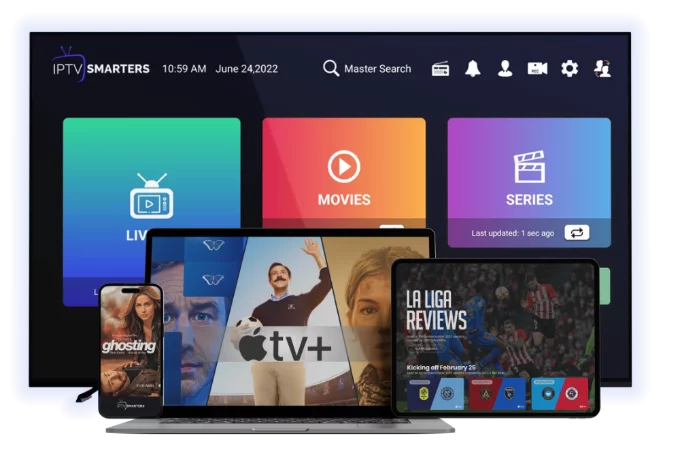
Once set up, IPTV looks and feels exactly like cable TV. You get a channel guide (EPG), you flip through channels with your remote, and on most apps you can pause, rewind, record, and access on-demand titles. The interface is usually faster and prettier than cable's set-top box.
9. Pros and cons in plain English
Pros
- 70–85% cheaper than cable
- Access to thousands of channels including international content
- Watch on any device, from anywhere
- No contract, no equipment rental
- On-demand library included
Cons
- Quality depends on your internet — buffering is possible on slow connections
- Customer service is rarely as polished as a major cable company
- Setup takes 5–15 minutes (vs an engineer doing it for you)
- Choosing a provider takes some homework — quality varies a lot
10. Is IPTV right for you?
IPTV is a strong fit if:
- Your monthly cable bill has crept past £60 / $80
- You watch TV on phones, tablets, or in more than one room
- You're a sports fan who wants leagues that aren't on your local cable package
- You travel and want your home channels with you
- You have decent broadband (15 Mbps minimum)
It's probably not right if:
- Your internet is unreliable or under 10 Mbps
- You want a single bill bundled with phone and broadband
- You strongly prefer a one-remote, no-apps experience
11. Next steps
If you're curious, the easiest first step is a free 24-hour trial — no card, no commitment. You'll know within a couple of evenings whether IPTV fits your household. Start with our [free trial](/free-trial) and we'll send setup instructions for your specific device.
For more depth, read [how to install IPTV on smart TV](/blog-details/how-to-install-iptv-on-smart-tv) or [IPTV vs cable in 2026](/blog-details/iptv-vs-cable-tv).
Frequently asked questions
IPTV stands for Internet Protocol Television. It's television delivered over an internet connection instead of through a cable, satellite dish, or aerial.
Not quite. Netflix is a streaming service with its own licensed catalogue of films and series. IPTV is more like digital cable — it gives you access to live broadcast channels plus often a VOD library. Many people use both together.
15 Mbps for HD streaming, 25 Mbps or more for 4K. If multiple people watch at the same time, add another 15–25 Mbps per simultaneous stream.
Yes. IPTV apps are available for iPhone, iPad and Android. You'll get the same channels and VOD library as on your TV.
IPTV from a licensed provider is fully legal in the UK. Unlicensed services that promise premium sports for unrealistic prices are not, and using them carries real risk.
#iptv basics
#how it works
#beginner